Now that you understand what CFOP (Código Fiscal de Operações e Prestações) is and why it matters, it’s time to look at how to configure CFOP in SAP. Below is a straightforward 5-step guide designed to help companies operating in Brazil set up CFOPs properly in their SAP systems.
Whether you’re new to the Brazilian localization setup or reviewing your current configuration, this guide is for you.
Step 1: Define CFOP Version
The first step is to define the CFOP version. This version tells SAP which CFOP structure (length and formatting) should be used.
You can maintain the CFOP version in the following ways:
-
Via transaction SM30 using the view
J_1BCFOPVERV -
Or through the IMG path:
IMG > Cross-Application Components > General Application Functions > Nota Fiscal > CFOP Codes > Define CFOP Versions
Use the following recommended settings:
-
Version:
1 -
Description:
NEW CFOP 4 DIGITS -
Redetermination: Leave unchecked (not needed unless you’re supporting legacy formats from before 2003)
-
CFOP Length:
4 -
External Length:
0 -
Text ID: Use any 2-character value, such as
AA,01, etc.

Step 2: Assign Validity Date to CFOP Versions
Next, assign a valid-from date to the CFOP version. This step tells SAP when this version becomes effective and allows you to assign it per region (state) if needed.
You can do this by:
-
Using transaction SM30 for view
J_1BCFOP_XREGNV -
Or navigating to:
IMG > Cross-Application Components > General Application Functions > Nota Fiscal > CFOP Codes > Assign Validity Date to CFOP Versions
Required fields:
-
Valid-From Date
-
Country
-
CFOP Version

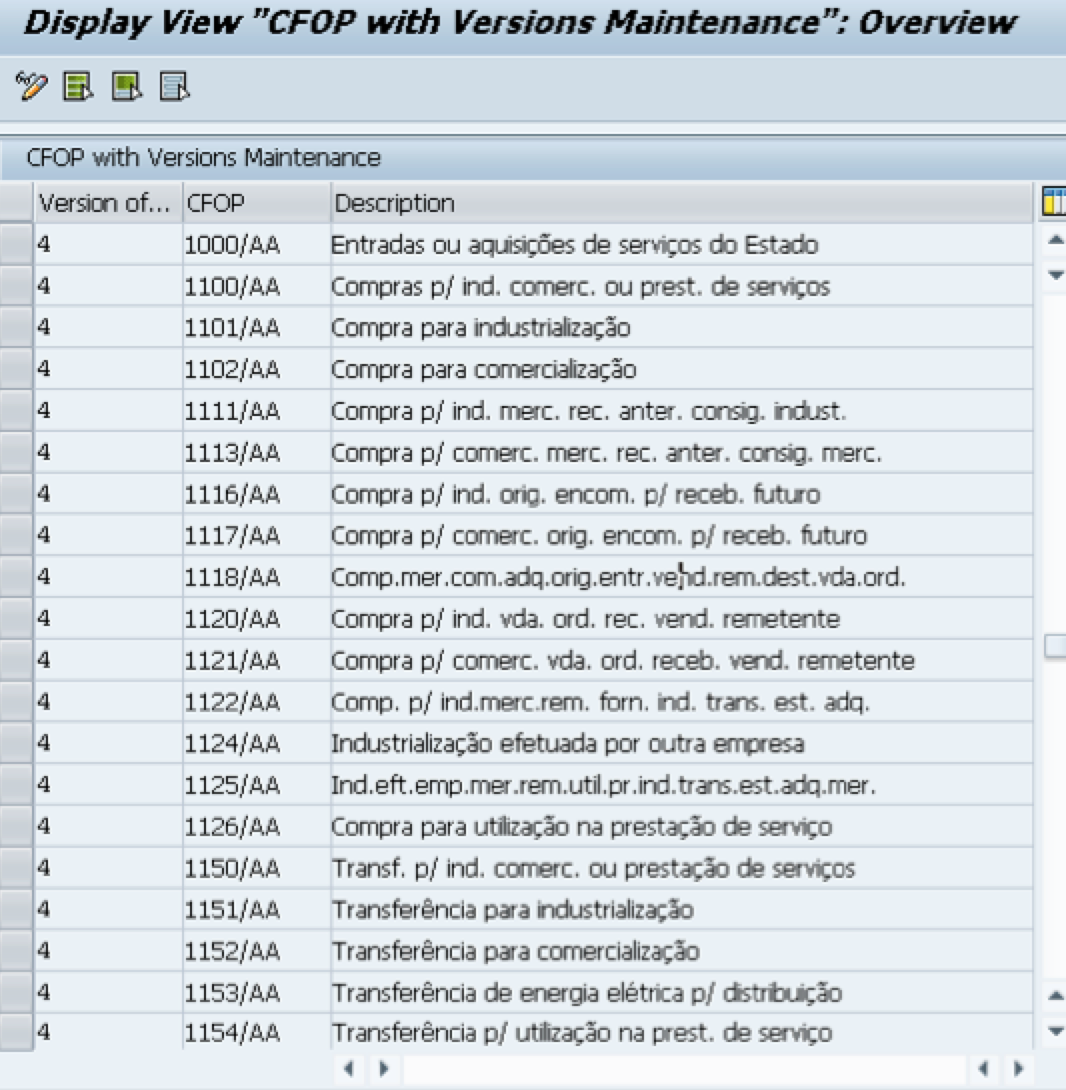
Step 3: Define CFOP Codes and Assign Versions
In this step, you’ll create and define the individual CFOP codes and link them to the version you previously defined.
To maintain these:
-
Use view
J_1BAGNVin SM30 -
Or navigate via IMG:
IMG > Cross-Application Components > General Application Functions > Nota Fiscal > CFOP Codes > Define CFOP Codes and Assign Version
The CFOP codes are legally defined by Brazilian tax authorities. You should consult your tax or fiscal department for the most updated list. If needed, you can reach out to us via the comments, and we’ll be happy to share the full list. See below a snapshot:
Step 4: Define CFOP Determination for Goods Receipts and Returns
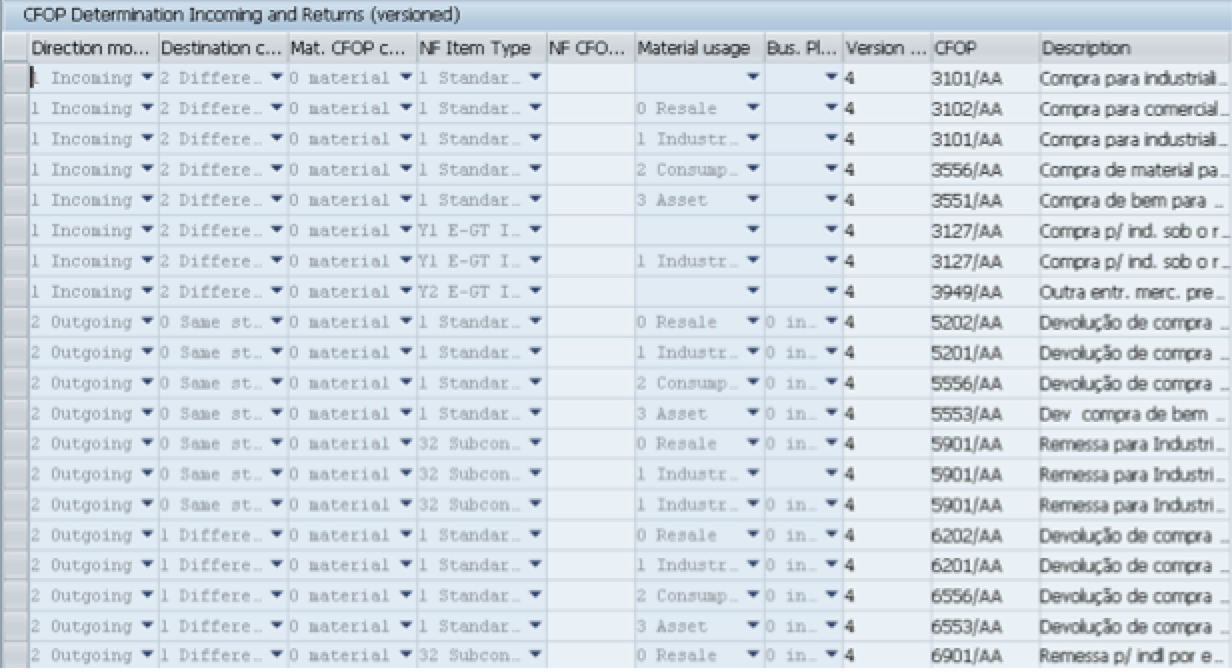
This step ensures that the correct CFOP is automatically determined when processing inbound goods movements (GR) or returns.
This is especially important for:
-
Inventory Management
-
Logistics Invoice Verification (LIV)
Configuration paths:
-
Use view
J_1BAONVin SM30 -
Or navigate to:
IMG > Cross-Application Components > General Application Functions > Nota Fiscal > CFOP Codes > Define CFOP Determination for Goods Receipts and Returns (Versioned)
Make sure the rules accurately reflect the company’s inbound scenarios, such as purchases from other states or imports. See below an example:
Step 5: Define CFOP Determination for Goods Issues and Returns
Just like step 4, this configuration ensures that the CFOP is automatically determined for outbound movements (GI), including returns.
Relevant modules:
-
Sales and Distribution (SD)
-
Inventory Management (MM)
Paths to maintain:
-
Use view
J_1BAPNVin SM30 -
Or use the IMG path:
IMG > Cross-Application Components > General Application Functions > Nota Fiscal > CFOP Codes > Define CFOP Determination for Goods Issues and Returns (Versioned)
The correct configuration ensures full compliance with Brazilian tax requirements and accurate tax reporting.
See an example below:

🔍 Want to Learn More?
For further reference, consult SAP OSS Note 571848 – CFOP codes: Description, Determination, and Versioning.
📌 Disclaimer
The information provided in this article is accurate and up to date as of the publication date. However, SAP technology and Brazilian tax legislation are constantly evolving. Always verify settings with the latest SAP Notes and consult with a certified SAP localization expert or tax advisor before implementation.


Copyright Notice: © Leo Anderson and SAPBR.COM (SAP Brazil) WordPress Blog, 2013.
Reproduction or use of this material without the express written permission of the blog’s author and/or owner is strictly prohibited. You are welcome to share brief excerpts or link to content, provided that full credit is given to Leo Anderson and SAPBR.COM, along with a clear and direct link to the original post.
 SAP Blog, SAP BRAZIL, ECC, S/4HANA and more...